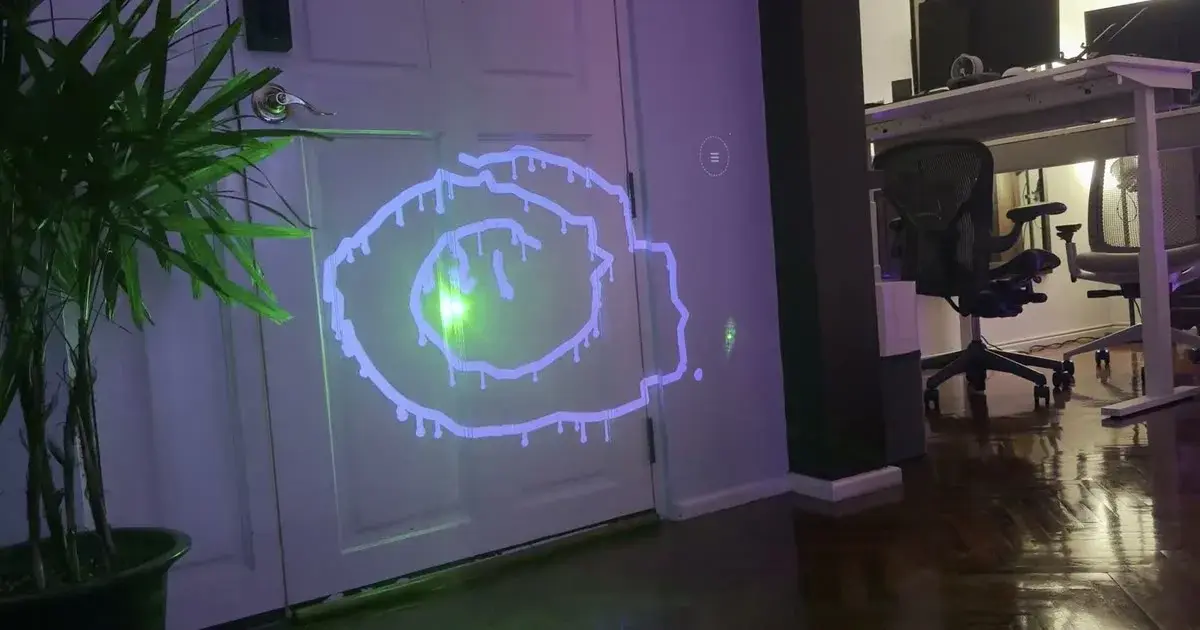
A projector on one side, a webcam on the other, a wall in front. You point a laser at it. The projector paints your stroke exactly where you aimed, and none of it needs an install: plain browser, no native app, zero dependencies, MIT.12
I watched the demo twice before it clicked.
Three spaces
The hard part is not the laser. It's lining up three spaces that don't naturally agree: the camera plane, the projector plane, and the wall.
In the app that's one click. The projector flashes white markers into the corners of its own area, the camera spots them, and the software works out the camera → projector mapping, a homography, kept in local storage.2 Then a three-second countdown while you get the laser ready, a four-second wave, and the detector learns how bright and what colour your dot actually is.2
From there each frame drops to 480 px, grabs the pixels dominated by your laser's colour, takes a weighted centroid around the brightest one, and sends that point back out to the wall.2
When the wall fakes the laser
The sneaky part comes later. The drawing on the wall looks like a laser to the camera. A green stroke, or the green bits of the rainbow brush, can be read as the very light source you're tracking.2
The answer is a feedback loop running backwards. Every frame the app renders what it's projecting into a canvas in projector space, keeps only the pixels that would pass the laser test, warps those through the calibration into camera space, and blanks them out of detection.2 The newest 400 ms of the stroke get excluded from that mask: that's where the real dot is.
A fake scorch, honestly done
The burn mode is the reversal that made me grin. A projector can only add light, so it can't leave a durable mark. So the code lies about the mark by subtraction. Along the stroke it throws a soft brownish halo; at the core it shows nothing at all, letting the plain wall read as the darkest, charred part.2 A scan surface option even photographs your wall first and warps the halo over its real bricks, so the scorch sits in the material instead of hovering on it.
Five minutes to remember it's not new
The idea has a genealogy. It starts at the Graffiti Research Lab in New York with L.A.S.E.R. Tag, then Michael Zeltner and Florian Hufsky took it to Vienna around 2007 in a native Processing app that tagged building facades.31 Laser Graffiti is that idea rebuilt from scratch for the browser, no Processing, no install.2
Setting it up is easy, not trivial. The wall has to stay put while the projector runs, the camera has to cover the whole area, and you need a pointer. Green lasers track best, and common sense still applies before you aim one at anything reflective.2
What's left open is what people actually do with it away from the demo page. It hit Hacker News in late August and sailed past 250 points; the author has already tried wiring an iPhone camera to the projector over AirPlay.4 That stop being a living-room toy about the time it reaches a hackerspace.