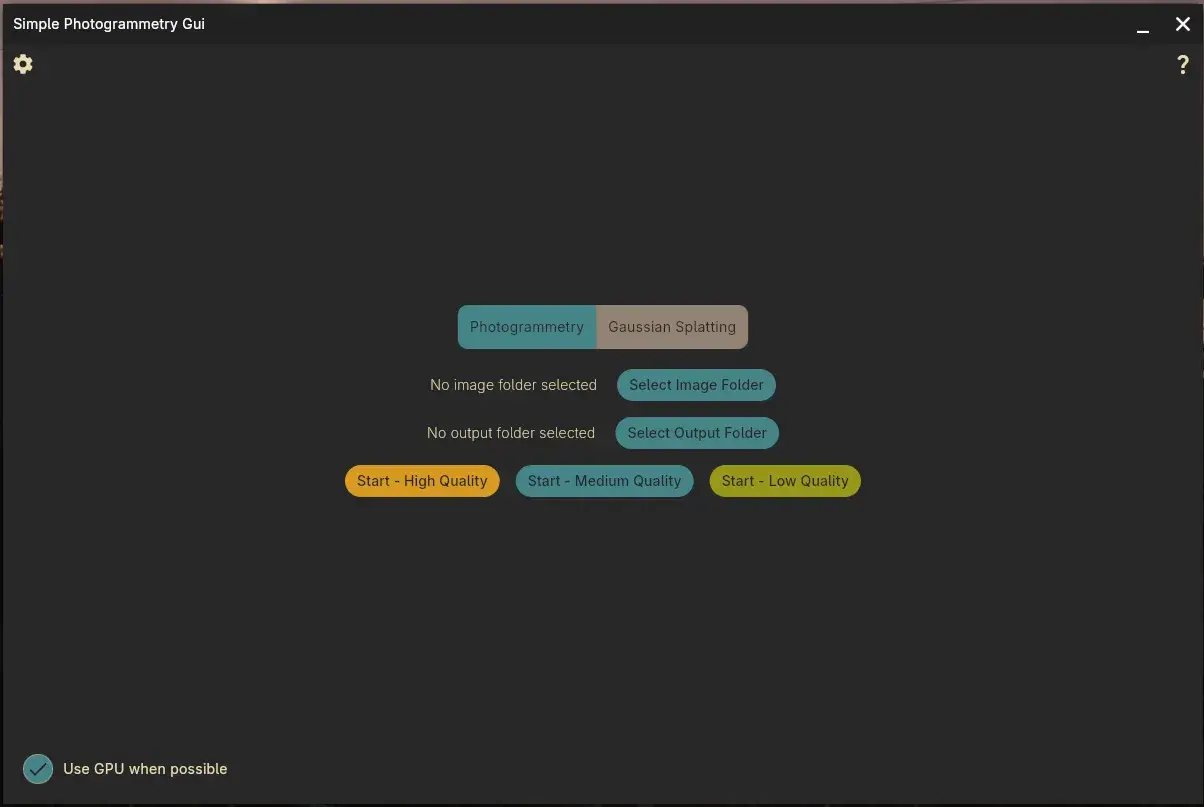
The CUDA build of Simple Photogrammetry GUI 1.1.6 for Linux is 1,411,971,576 bytes. The CPU package still exceeds 1.38 billion bytes, the beta AMD/HIP build reaches 1.44 billion, and even the Windows archive now approaches 324 MB.2 Those numbers look excessive beside the README instructions, which amount to choosing a folder of photographs, choosing an output folder, selecting a quality level and waiting for textured.obj.1
Package size turns out to be a useful description of the project. Edin Spiegel leaves COLMAP, OpenMVS, PoissonRecon, mvs-texturing, PyMeshLab and Brush doing the specialist work they already do well, then takes responsibility for the awkward joins between them.1 Paths, dependencies, intermediate formats, GPU choices, retries and logs are no longer a checklist that every new user has to reconstruct from memory.
The glue
Pressing Start launches COLMAP for feature extraction, image matching, view-graph calibration and global mapping; exhaustive_matcher is the default and sequential matching remains available in settings.1 COLMAP already exposes each stage as a separate command with its own flags, paths and formats.3 Spiegel's application mainly decides how those stages are joined and what should be handed to the next program.
After the cameras are aligned, COLMAP undistorts the images and exports the model in several forms. InterfaceCOLMAP then moves the scene into OpenMVS, which densifies the point cloud and can also reconstruct a mesh.14 Spiegel uses PoissonRecon as the default mesher instead; SurfaceTrimmer cleans the result, a small Python/PyMeshLab utility reduces its face count, and mvs-texturing finally projects the registered photographs onto the geometry.156
The eventual file is simply textured.obj, although the route to it has involved a COLMAP database, sparse and dense reconstructions, text exports, NVM, .mvs and .ply files.1 A person scanning a figurine or a workshop part has little reason to care about any of those representations, but every hand-off depends on the previous program producing exactly what the next one expects.
Small failures
Photogrammetry rarely fails as neatly as one clean exception. A stage can run out of memory, reconstruct too few cameras, leave a file the next program cannot consume or stumble over something as ordinary as a filename containing spaces. Release 1.1.6 fixes exactly that last case: spaces in image filenames could break dense point-cloud reconstruction, so the application now copies and renames the images before processing.2
A filename repair is mundane, but it is exactly the sort of thing that determines whether a tool feels usable. The reconstruction algorithm is unchanged; what disappears is one failure mode that previously had to be diagnosed by the person running the scan.
OpenMVS densification extends the same idea. High, medium and low quality begin with maximum image resolutions of 2560, 1920 and 1024 pixels; when model_dense.mvs fails to appear, the application calls DensifyPointCloud again and reduces maximum resolution to 70 percent of the previous value, with a loop planned for as many as five attempts.1 On Windows it also cleans leftover .dmap files between attempts.
Mesh reconstruction has another recovery loop. OpenMVS mode progressively changes its decimation setting and allows up to ten planned attempts, while PoissonRecon uses a quality-dependent reconstruction depth before trimming and final decimation.1 None of these choices can rescue every bad set of photographs, but they turn part of the troubleshooting process into repeatable software behaviour.
A personal script can rely on its author's memory: delete this temporary file, lower that parameter, run this command again. A distributable application cannot assume that private knowledge, so those habits have to become explicit decisions in the workflow if somebody else is expected to use it.
Shipping the stack
Installation is the other place where private knowledge has to disappear. On Windows the application checks for COLMAP, OpenMVS, mvs-texturing, Brush, PoissonRecon, SurfaceTrimmer and several helper executables, then offers to fetch missing dependencies while distinguishing CUDA, CPU and AMD packages.1 AMD/HIP remains explicitly beta in v1.1.6, whose release notes tell Windows users with an earlier CPU installation to re-download the dependency set.2
Linux ships the dependency set inside the AppImage, while the repository also offers Nix CPU and CUDA builds that pin the environment and place executables where the application expects them.1 Much of the 1.4 GB therefore belongs to the promise behind Start: on another machine, the same button should still find a predictable toolchain instead of whatever happens to be installed globally.
Version 1.1.6 adds a control for downloading that stack again, improves extraction on Windows and introduces the beta AMD/HIP path.2 Those are installer features, yet they sit directly on the critical path to a successful scan; a perfect reconstruction pipeline is of little use when half its binaries are absent or incompatible.
Keeping logs
Spiegel has not hidden every piece of plumbing. The main window asks for folders and a quality level, while advanced settings retain the matching mode, CPU thread count, OpenMVS versus PoissonRecon, extra meshing flags and the number of Gaussian-splat training steps.1
Version 1.1.6 also streams stdout and stderr from child processes into a visible log, while the Stop control tracks launched processes so they can be interrupted together.12 For software built around command-line engines, that compromise matters: routine use stays short, while a failed job still leaves something concrete to inspect.
Two paths
The opening stages now lead somewhere other than a textured OBJ as well. Switching to Gaussian Splatting keeps feature extraction and camera alignment, then hands the prepared material to Brush instead of continuing through OpenMVS and mesh texturing; the default setting asks for 30,000 training steps.17
The Gaussian-splat branch makes the boundary of the project clearer. Spiegel has built a shared route up to the point where different reconstruction engines can receive prepared photographs and estimated cameras; he has not built another universal 3D engine. Hackaday framed it similarly, with existing photogrammetry utilities brought under one GUI so a newcomer does not have to assemble the entire chain first.8
Open source reaches this awkward stage often: the specialist engines are already excellent, yet using them together still assumes somebody knows which versions belong together, which formats cross each boundary and what to do when step seven never creates the file required by step eight. Dependency installation, error collection and sensible defaults are product work even when none of them improves the underlying algorithm.
Simple Photogrammetry GUI moves that product work into the application, and its 1.4 GB bundle is almost a physical measurement of the decision.