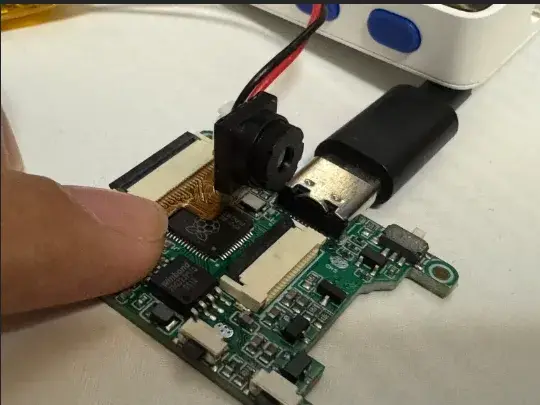
An OV2640 can produce a 1600 × 1200 image, and PicoCamera knows how to request it, but the interesting part begins when that frame reaches the microcontroller and has to fit in its memory.
I checked PicoCamera at commit 6c558bd, the source tagged as version 0.4.0 on August 18, because that release adds PSRAM-backed frame buffers for RP2350 boards.1 The change matters precisely because the camera can offer images much larger than the internal memory available to hold them.
The RP2040/RP2350 compilation claim is well supported. In practice, the useful dividing line is the amount of image data that can exist in memory at one time, first in the larger SRAM of RP2350 and then in external PSRAM when a board actually provides it.
Three sensors
PicoCamera deliberately mirrors part of the esp32-camera API: the esp_ prefix becomes pico_, and a sketch continues to configure a camera_config_t, borrow a frame through pico_camera_fb_get() and obtain a runtime sensor object for controls.1
Three sensors are listed as hardware-verified: OV2640, OV3660 and OV7670. The first two can emit JPEG in the sensor itself, whereas the OV7670 supports RGB565 here and has no onboard JPEG encoder.1
Capture uses Raspberry Pi's PIO and DMA hardware, with the eight-bit camera bus occupying consecutive GPIOs and VSYNC, HREF and PCLK selected at runtime; sensor configuration travels over SCCB through the hardware I2C peripheral, so the normal pin-routing rules of the chip remain part of the design.2
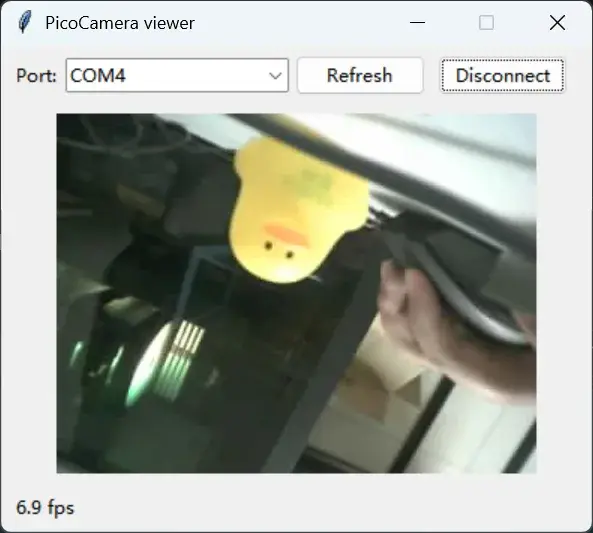
Somebody arriving from an ESP32 camera project gets a familiar programming surface that reduces porting work, but the memory and pin constraints underneath it remain those of a Pico-class microcontroller.
The RGB wall
The cost of one RGB565 frame is easy to calculate because every pixel takes two bytes.2 At 320 × 240, that is 153,600 bytes, or 150 KiB. Moving to 640 × 480 raises that to 614,400 bytes, exactly 600 KiB, and a 1600 × 1200 framebuffer reaches 3,840,000 bytes, about 3.66 MiB.
Raspberry Pi specifies 264 KiB of SRAM for RP2040 and 520 KiB for RP2350.5 Even if every byte were available to the camera, a 600 KiB VGA RGB565 frame would fit in neither chip's internal SRAM.
PicoCamera's own guide therefore calls QVGA 320 × 240 the practical RGB565 ceiling on RP2040.2 Real programs also need memory for their stack, code data, driver structures and whatever work happens after capture.
This is why moving from RP2040 to RP2350 does not solve raw capture by itself. The newer chip nearly doubles internal SRAM, yet VGA RGB565 still exceeds it by about 80 KiB before any application overhead is counted.
PSRAM changes the map
PicoCamera 0.4.0 adds three buffer-location policies: SRAM, PSRAM or automatic. On an RP2350 board whose PSRAM support is enabled in the Arduino core, automatic allocation tries pmalloc() first and falls back to SRAM, whereas an explicit PSRAM request fails when external memory is unavailable.3
RP2040 has no equivalent path in the library, so its frame buffers remain in SRAM.2 External memory becomes a functional boundary: several megabytes of PSRAM make VGA, SVGA or UXGA RGB565 buffers plausible, while a board lacking that memory cannot make an oversized raw buffer fit.
Buffer count matters as well: two QVGA RGB565 buffers already require 300 KiB before allocation overhead, so fb_count = 2 exceeds the RP2040's entire SRAM although one QVGA frame by itself fits comfortably enough.3
JPEG bends the rule
OV2640 and OV3660 contain JPEG encoders, allowing PicoCamera to receive compressed data instead of reserving two bytes for every pixel.1
The library cannot know the compressed size beforehand. It allocates an estimated width × height / 4 + 8 KiB buffer and captures the variable-length JPEG into that space.3
Under that formula, UXGA needs about 477 KiB of buffer. It falls below the RP2350's 520 KiB total on paper, although the margin for everything else would be tiny, and remains far beyond RP2040's 264 KiB.
To be sure, 477 KiB is only an allocation estimate for JPEG output. The project's own documentation warns that it covers typical scenes and pathological noise can overflow the allocation.2 Compression makes larger captures possible with much less RAM, but variable-size output remains variable.
What “compatible” means
The other part of the audit was simpler: check whether RP2040/RP2350 compatibility exists somewhere beyond the README.
At commit 6c558bd, upstream CI compiles the four main examples across RP2040, RP2350 Arm, RP2350 RISC-V and an RP2350 environment with the PSRAM code path enabled, using warnings-as-errors. A separate workflow also builds the bare Pico SDK CMake example at the same commit.4
Those jobs verify compilation. They do not put a physical camera on every entry in the matrix. Hardware support is documented separately: the repository marks OV2640, OV3660 and OV7670 as tested, but publishes no comprehensive throughput or frame-rate benchmark across every resolution.1
Capture is synchronous as well: pico_camera_fb_get() performs a blocking frame capture, while the grab_mode behaviour available in esp32-camera has not been implemented and the guide says so explicitly.2
An API cannot create RAM
Adafruit highlighted PicoCamera as an Arduino-compatible camera library for RP2040 and RP2350.6 That description is accurate, but the project's most useful quality may be the constraints it leaves visible.
The constraints remain visible all the way down: eight consecutive GPIOs for the camera bus, SCCB pins constrained by hardware I2C routing, JPEG rejected on a sensor lacking an encoder, allocation failure when a frame will not fit, and PSRAM only where the board really carries it.
Those details make the compatibility claim credible because PicoCamera brings the programming model closer to esp32-camera while keeping the very different memory architecture of an RP2040 visible.
A maker therefore has to make the useful decision earlier: decide what must happen to the image before deciding how large it should be. Local processing on a raw QVGA frame, a larger JPEG sent elsewhere and a VGA RGB565 stream are three very different memory problems.
The sensor can see big, while the framebuffer keeps the bill for every pixel.