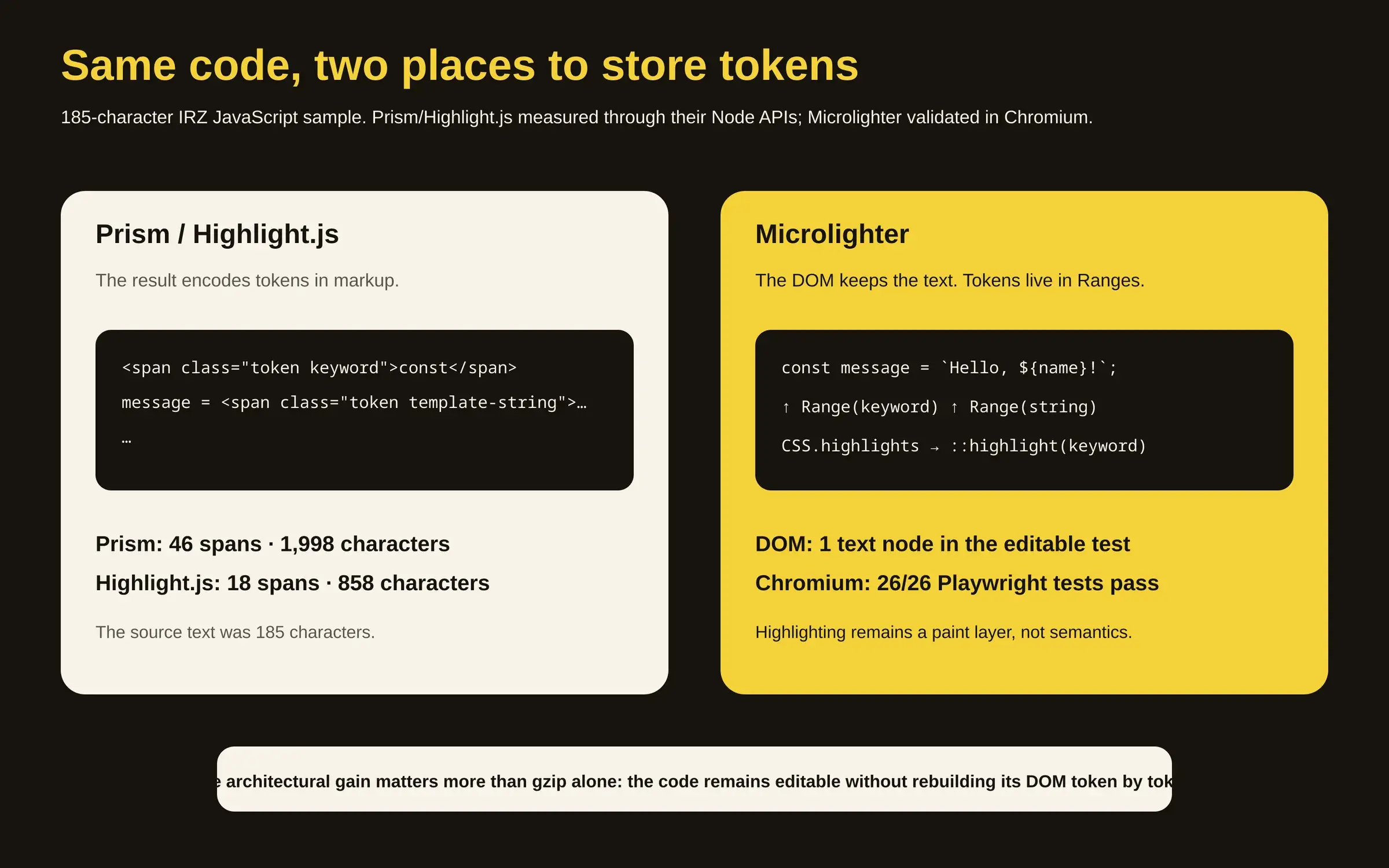
For years, coloring three words in a code block often meant manufacturing thirty HTML elements.
A tokenizer recognizes const, a string, a number and a comment, after which the result becomes a forest of <span class="token …"> elements. That method works extremely well; Prism and Highlight.js have colored a large portion of the technical web with variations on it.
Microlighter 2.1.0 stores those tokens somewhere else: outside the DOM.
Dave Rupert's library creates Range objects over the existing text, groups them into Highlight objects, registers them through CSS.highlights, then lets ::highlight() apply the colors.124
The code remains text while highlighting becomes a browser paint layer, an architectural change more interesting than the project's “2 KiB” headline by itself.
One node
Microlighter's core never replaces <code> contents with tokenized HTML. When a TextMate rule matches a region, the implementation creates a Range, points it at the beginning and end of the text node, then adds that range to a category such as keyword, string or comment.2
CSS can then style the registered group:
::highlight(keyword) {
  color: var(--syntax-keyword);
}
MDN describes exactly this property of the CSS Custom Highlight API: arbitrary text ranges can be styled without affecting the underlying DOM structure.45
We checked whether that promise survives more than a README snippet.
After building commit d7fec9e, all 15 Node tests pass. We then installed an isolated Playwright Chromium and ran the browser suite in CI mode: 26 out of 26 tests pass, covering all 37 grammars, themes, nested Svelte/Vue/HEEx syntax, the optional component and live editing.2
One test captures the architecture particularly well. After editing a contenteditable code block, it requires the block to still contain exactly one child, a Text node, while also verifying that active highlight ranges point into that node.2
Forty-six spans
To make that difference concrete, we passed the same 185-character JavaScript excerpt through the Node APIs of Prism 1.30.0 and Highlight.js 11.12.0.
On the same 185-character input, Prism returned 1,998 characters of HTML containing 46 <span> elements, whereas Highlight.js returned 858 characters and 18 spans.
Those ratios say nothing about execution time or memory; they only locate the token information, which sits inside the generated markup for those two outputs and inside the highlight registry for Microlighter.
That separation becomes particularly attractive in an editor, where traditionally tokenized text may require rebuilding a nested element structure after edits; Microlighter can keep the same text node and recompute ranges.2 The work still exists; the difference is that the browser now provides a rendering channel separate from the DOM.
Two kilobytes
Microlighter's other argument is size. Its 2.1.0 build even enforces a budget: the automatic runner must stay within 2.05 KiB gzip. Our build reproduces the claim at 4.41 KiB minified, 2.05 KiB gzip and 1.88 KiB Brotli.2
Downloading the core alone does not yet highlight JavaScript, because grammars arrive on demand and themes remain separate CSS resources.
We therefore packed the versions used in this test from npm, Microlighter 2.1.0, Prism 1.30.0 and Highlight.js 11.12.0, and added the gzip sizes of the resources needed for comparable configurations.367 Every option gets a theme; no bundler merging, CDN cache or joint compression is assumed.
For JavaScript + theme:
- Microlighter: 4,081 gzip bytes;
- Prism: 5,890 bytes;
- Highlight.js: 28,610 bytes.
For HTML + CSS + JavaScript + theme:
- Microlighter: 5,766 bytes;
- Prism: 7,552 bytes;
- Highlight.js: 35,816 bytes.
In these exact configurations Microlighter is roughly 31% smaller than Prism for JavaScript and 24% smaller for the three common web languages, while the gap to modular Highlight.js is much larger.
A CDN may use Brotli differently, a bundler can merge resources, cached files may transfer nothing, and real sites load different language sets, so these figures should be read as a reproducible comparison of the npm artifacts we actually inspected rather than universal network-byte measurements.
Deferred cost
The 2 KiB core remains small partly because much of the material arrives later.
Microlighter 2.1.0 ships 37 grammar files. In our build they average 0.73 KiB gzip, ranging from 0.24 KiB for JSON to 1.37 KiB for JavaScript, while its ten themes average about 0.56 KiB gzip each.2
Some languages also pull dependencies. HTML declares CSS, JSON and JavaScript; TypeScript depends on JavaScript; TSX depends on JavaScript and TypeScript.2
Lazy loading is therefore the actual strategy: a page showing one language should not pay for thirty-six others.
The repository even contains a small sign of how quickly the project is moving: the feature summary near the top of the README still says “35 languages”, while its Languages section lists 37 and the build produces 37 grammar modules.2 In this case the code simply outran a headline number.
For context, the packages we inspected contain 298 minified prism-* component files and 386 files under highlight.js/lib/languages. Those are not directly comparable supported-language counts, because aliases, dependencies and variants make files differ from languages, but they do show Microlighter's deliberately narrower scope.
Its README says so explicitly: the trade-off is less language coverage and grammar accuracy than larger tools such as Shiki.29
Native regex
Part of the economy comes from the tokenizer itself.
Microlighter uses TextMate-inspired grammars but evaluates them with the browser's native RegExp; there is no bundled Oniguruma engine, WebAssembly runtime or generated token markup.2
The implementation walks rules, resolves includes, compiles expressions when needed, chooses the next match and recursively enters begin/end pairs.2
The approach is sufficient for the 37 bundled grammars and their tests, but a sophisticated TextMate grammar cannot automatically be assumed to work unchanged with the fidelity of an engine implementing the broader behaviour expected by editors.
Microlighter therefore chooses a useful subset over a general engine, accepting some compatibility work in exchange for a much smaller runtime.
For short technical articles, documentation or a lightweight editor, that may be an excellent bargain. Reproducing an editor's exact highlighting across dozens of obscure languages can bring the saved complexity back as grammar work.
Recent browser
The architecture also depends on a relatively young browser primitive.
MDN marks the CSS Custom Highlight API as Baseline 2025, broadly available in current browsers since June 2025, while warning that older devices and browsers may not support it.4
That differs sharply from span-based highlighting, whose rendering mechanism relies on HTML and CSS primitives that have been dependable for decades.
A product supporting older browsers therefore has a genuine compatibility decision to make. For modern controlled environments, the browser can finally own a job libraries previously had to materialize themselves.
No bold
The CSS Custom Highlight API has another meaningful constraint: ::highlight() accepts only a limited set of CSS properties.5
Rupert calls out the practical consequence directly: arbitrary font-weight, italics and font-family changes are not available for recreating every rich editor theme.1 Microlighter themes consequently focus on semantic category colors.
That styling limit follows directly from the architecture: a highlight pseudo-element paints a text range rather than becoming a fully fledged typographic element inserted into the tree.
Accessibility
“Clean DOM” is dangerously close to becoming a magic incantation, so we tested something much more prosaic: the contrast of the colors shipped by the project.
For each of Microlighter 2.1.0's ten themes, we calculated the contrast between its 14 token-color variables and the background in both light and dark modes, using 4.5:1, the WCAG 2.2 threshold for normal text.8
We found 45 theme × token × mode combinations out of 280 below 4.5:1.
Three themes have no failures in our grid, github, vesper and vscode-plus; GitHub's lowest ratio is 4.55:1 for light-mode comments and 6.15:1 for dark-mode comments, while the light palette in solarized-light places all fourteen token colors below 4.5 in our calculation.
The table is only a contrast check, since actual font sizes, adjacent colors, forced-color modes, page context and user needs still require a full audit; what it demonstrates is narrower but useful: modern rendering architecture does not guarantee accessible color choices.
The CSS Highlight API also adds no semantic accessibility meaning to syntax tokens. const remains the text const, merely painted differently; a screen reader does not receive a “keyword” role because a Highlight happens to carry that registry name.
Editing
The architecture becomes most tangible inside editable code. Microlighter demonstrates contenteditable="plaintext-only" and reruns highlighting on each input; when we exercised that path in the Playwright suite, the text remained intact after typing, the block still contained one Text node and new ranges were registered.2
The optional <micro-lighter> component adds copy controls and line numbers. Its complete entry bundle measures 3.54 KiB gzip compared with 2.05 KiB for the automatic runner, before grammar and theme.2
The resulting boundary is useful because syntax coloring no longer needs to mutate the DOM, while controls, gutters, buttons and editor behaviours are genuine interface components that quite reasonably remain in the structure; keeping those jobs separate avoids pretending they are one problem.
Browser pays
Microlighter therefore proves something more interesting than “a syntax highlighter can be tiny”.
It shows what happens when the web platform gains a primitive that used to be missing. A library no longer has to manufacture hundreds of elements merely to attach color, leaving its own code focused on the value it actually adds: understanding source text and producing ranges.
The savings come with visible trade-offs: a modern browser requirement, 37 grammars rather than hundreds, a simplified TextMate interpreter, constrained highlight styling, and accessibility choices that still need auditing.
Those trade-offs are exactly what make the project interesting. Two kilobytes proves very little by itself; the more consequential result is the architectural question the project makes concrete: should JavaScript still materialize something in the DOM when the browser can now paint it directly?