On August 5, a Framework Laptop 13 that had worked for roughly three years stopped being a laptop and became a board-level electronics project.
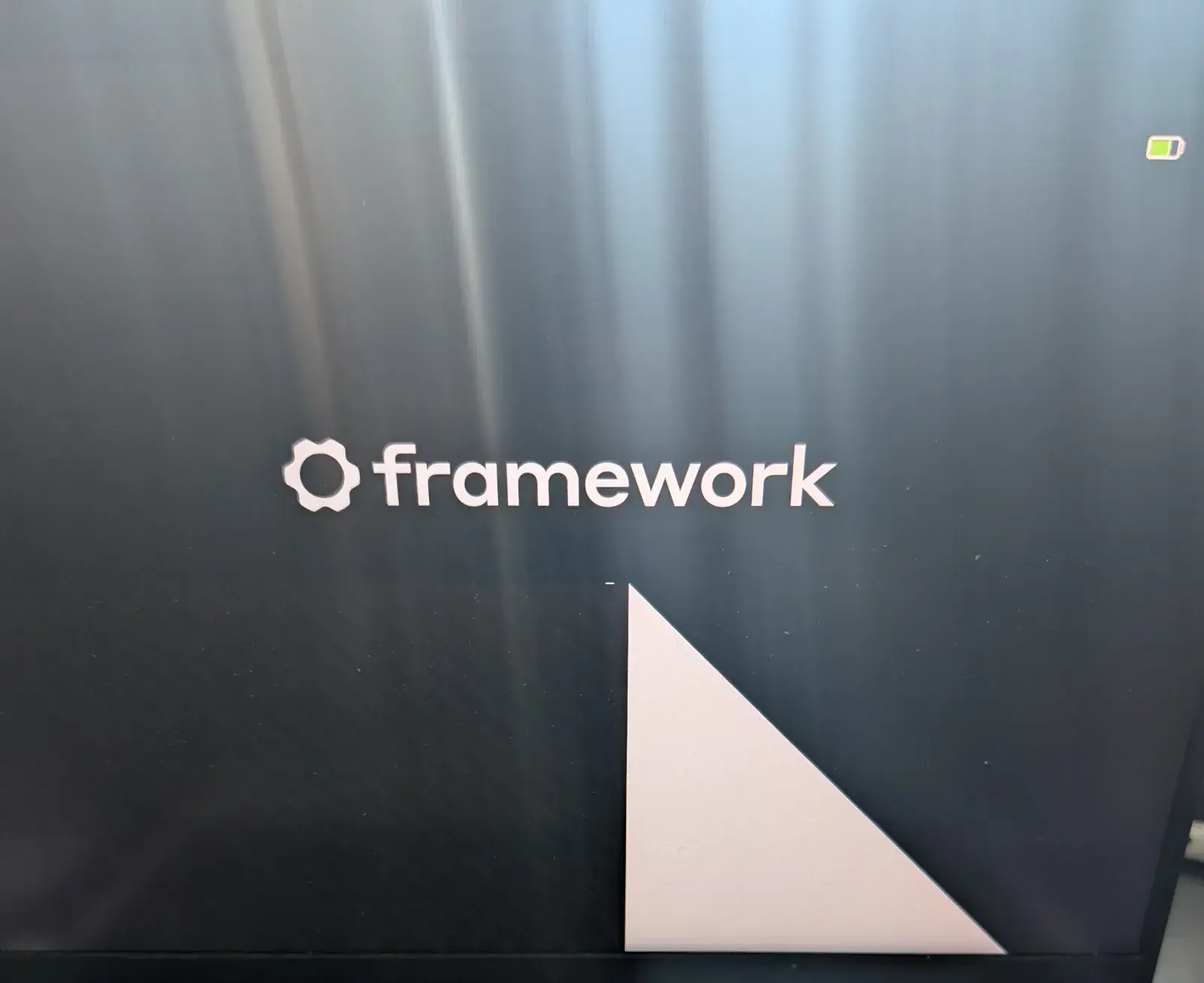
Its owner, Guanzhong Chen, had started a BIOS update to version 3.20 through fwupdmgr; the machine rebooted into the firmware updater, where the display filled with a corrupted triangle-like pattern and stopped progressing. Chen left it alone, but even after the battery eventually drained the machine had not recovered and would no longer boot normally.1
That would already be a useful cautionary story about firmware updates. The part that makes it more interesting is the machine involved.
Chen says he bought the Framework partly because it was sold around repairability and upgradability. The RAM and SSD were his choice. Modules could be replaced. The mainboard was accessible. Linux firmware updates arrived through the Linux Vendor Firmware Service instead of a random Windows-only utility.16
After the failed update, however, the repair path changed scale abruptly. Framework support went through reset and troubleshooting steps, but Chen says that, because the machine was out of warranty, the remaining supported option was a replacement mainboard costing more than CA$500.1
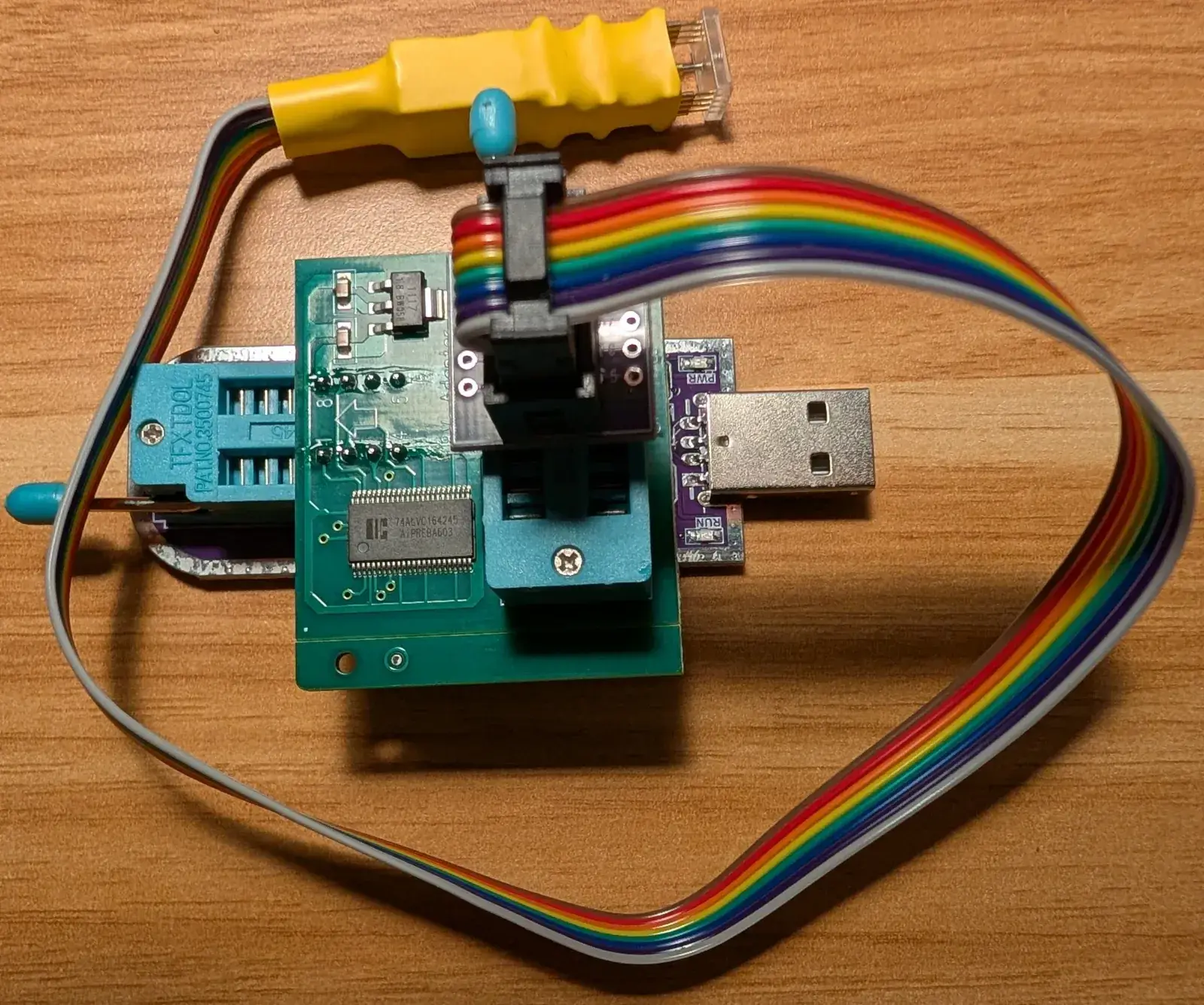
He instead bought roughly US$20 worth of tools and reprogrammed the BIOS flash chip directly.1
The tempting version of this story is therefore simple: owner beats manufacturer with a cheap programmer.
That version misses the problem.
Rewriting a flash chip is ordinary bench work for people who repair corrupted PC firmware, and has been for decades. What makes Chen's case unusual is the change of interface: on a laptop chosen specifically for repairability, one failed update moved him from screwdriver-level module replacement to identifying a 1.8-volt SPI package, choosing a suitable programmer, checking electrical levels, extracting a usable image and holding pogo pins against a tiny chip on the board.1
Repairability had not disappeared. It had changed interface.
And the new interface was meant for a lab bench, not for the person who owned the computer.
Replaceable, not recoverable
Framework has done something important to the physical architecture of laptops. Chen’s own account describes choosing his RAM and SSD separately, using Framework’s swappable ports, and later being offered a replacement mainboard as a discrete part.1 Compared with a laptop where storage, memory and I/O are effectively permanent decisions, the physical architecture is plainly different.
That kind of modularity matters. It also encourages a particular mental model of repair, one in which the failed component is isolated, purchased and swapped.
Firmware breaks that model.
Nothing visibly burned on Chen's board. The processor did not need to be upgraded. The laptop had enough working electronics to begin the update. The failure happened while changing the small body of code that prepares the hardware to become a computer.
In the two Framework community cases opened for this run, a similar boundary appears. A July 2026 thread contains several reports from AMD Ryzen 7040 owners whose update from BIOS 3.18 to 3.20 stopped during the flash process.2 A separate March 2025 thread describes an update from 3.05 to 3.07 that glitched, left the machine unable to boot and eventually led support to suggest purchasing a new board because the owner was out of warranty.3
That older owner recovered the machine anyway. The method was much rougher than Chen's later setup: wires soldered to the SPI flash, a level shifter, an external supply and a Raspberry Pi configured for SPI. The owner dumped the existing contents several times, extracted the ROM from the update capsule and wrote it directly to the chip.3
Two successful board-level recoveries do not establish a failure rate. They do not prove that every 7040 mainboard has the same fault, and they do not prove that Framework has no recovery mechanisms anywhere in the platform. They establish something narrower and more useful: in these documented failures, the normal owner-facing recovery steps did not bring the machine back, while external programming of the firmware chip did.13
That distinction is exactly where repairability deserves another layer.
Easy removal of a mainboard says very little about how difficult its firmware will be to recover.
Delivery got better
The failed update did not arrive through some suspicious executable downloaded from a forum attachment.
Framework publishes BIOS and driver releases for the AMD Ryzen 7040 Series on its knowledge base.4 On Linux, Chen had previously updated through fwupdmgr, the command-line client around fwupd.1
The infrastructure behind that experience is genuinely good.
The Linux Vendor Firmware Service describes itself as a secure portal where hardware vendors upload firmware, packaged with metadata, so clients such as fwupdmgr and GNOME Software can deliver updates across Linux distributions.6 It removes an old and particularly stupid source of friction: needing the right operating system, boot image or vendor utility merely to receive firmware for hardware you own.
But distribution and recovery are different design problems.
A good delivery path answers: how do we get the new image onto the machine?
A good recovery path answers: what happens when that operation stops halfway through?
Those questions are easy to merge because the update tool normally handles both invisibly. When everything works, the laptop reboots, applies the capsule and returns. The user never has to know which region of flash was rewritten or which component executes first after power-on.
When the process fails, the hidden architecture suddenly becomes the repair manual.
The irony is useful. LVFS makes firmware feel more like ordinary software. A failed BIOS flash reminds us that it is still software stored inside an electrical system whose first instruction must work before almost any other recovery tool can exist.
A computer to recover
Many software failures are recoverable because a lower layer remains alive.
A broken application is reinstalled by the operating system; another boot volume may rescue a damaged system, while a rescue environment lets an operator inspect the filesystem. In each case, something underneath the failure remains alive enough to load the tools.
Firmware sits close to the bottom of that stack.
If the code required to initialize memory, devices and boot media is damaged badly enough, telling the user to "download the installer" becomes comedy. The machine needs a smaller, more protected recovery mechanism that survives the failure, or the repair has to arrive from outside.
Dell documents exactly this idea for supported systems. Its BIOS recovery procedure can use a recovery file stored on the hard drive, with a prepared USB drive as a fallback. Dell explicitly positions the feature for cases including corrupted BIOS firmware, black screens and POST failures.7
The point is not that Dell is universally more repairable than Framework. A laptop is much larger than its BIOS recovery routine, and repairability cannot be ranked from one support page.
The comparison only proves that owner-facing BIOS recovery is a product decision that can be designed into a PC.
Chen makes a similar comparison from memory with an old ASUS desktop board whose recovery feature could look for a firmware image after a bad flash.1 Implementations differ, but the architectural idea stays stable: reserve a path independent of the firmware region currently being rewritten.
Without such a path, repair usually drops one level lower, to the flash chip itself.
The tiny electrical object
The term "BIOS update" makes the operation sound abstract. Chen's repair becomes easier to understand when he stops treating the BIOS as a feature and starts treating it as a component.
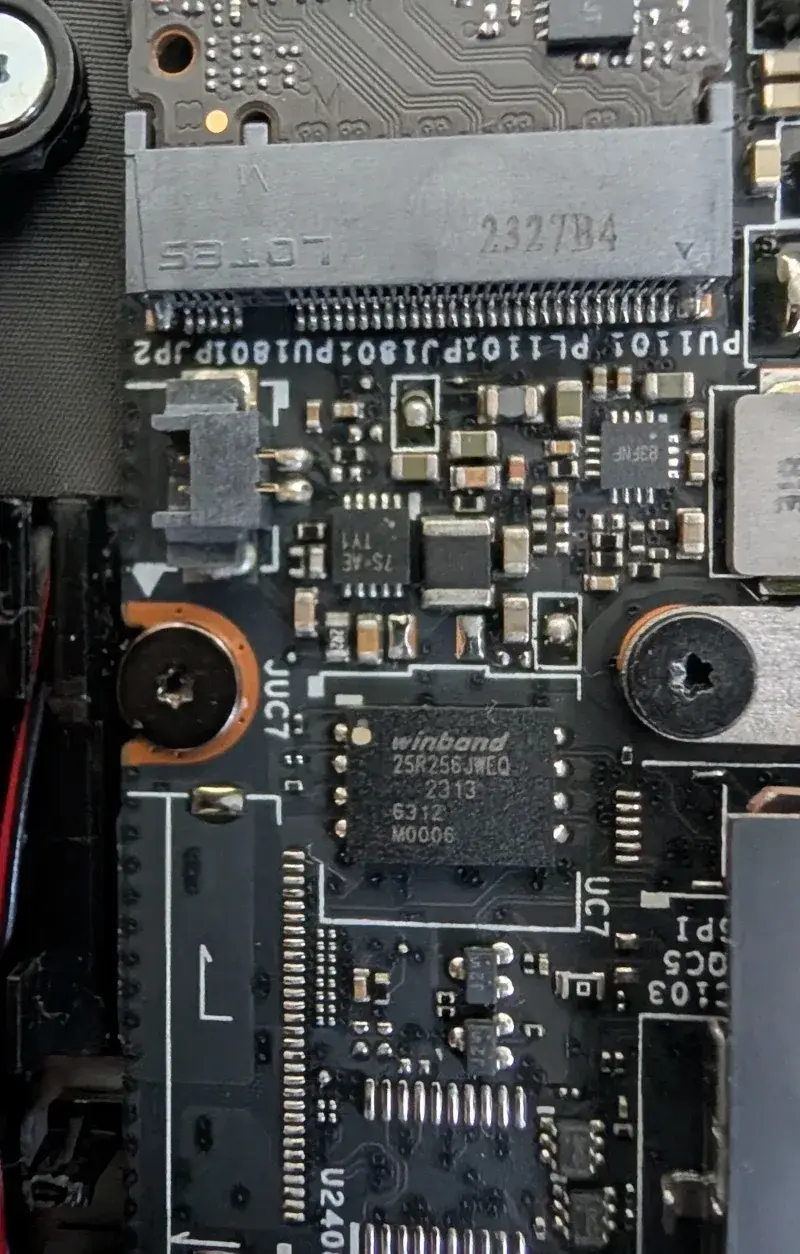
On the Framework AMD 7040 mainboard, he identifies the relevant Winbond serial flash device and traces its package and voltage requirements.1 The chip is a small WSON package. It communicates over SPI. It operates at 1.8 volts rather than the 3.3 volts common on many hobbyist programmer setups.1

Those details are not trivia. They decide whether the repair works or damages something else.
A flash programmer needs to do only a few conceptual things: identify the device, read bytes, erase regions, write new bytes and verify that the result matches. flashrom, the open-source utility Chen uses, describes exactly this job. Its documentation lists reading, writing, verifying and erasing flash chips across SPI and other interfaces, using internal or external programmers. It also explicitly notes compatible crossflashing and hotflashing as recovery techniques.5
The simplicity ends at the electrical boundary.
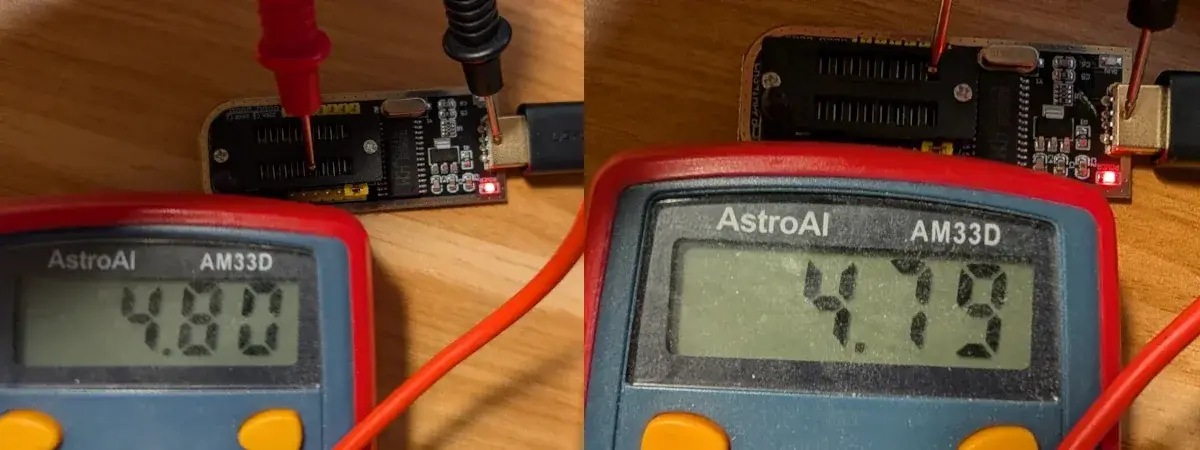
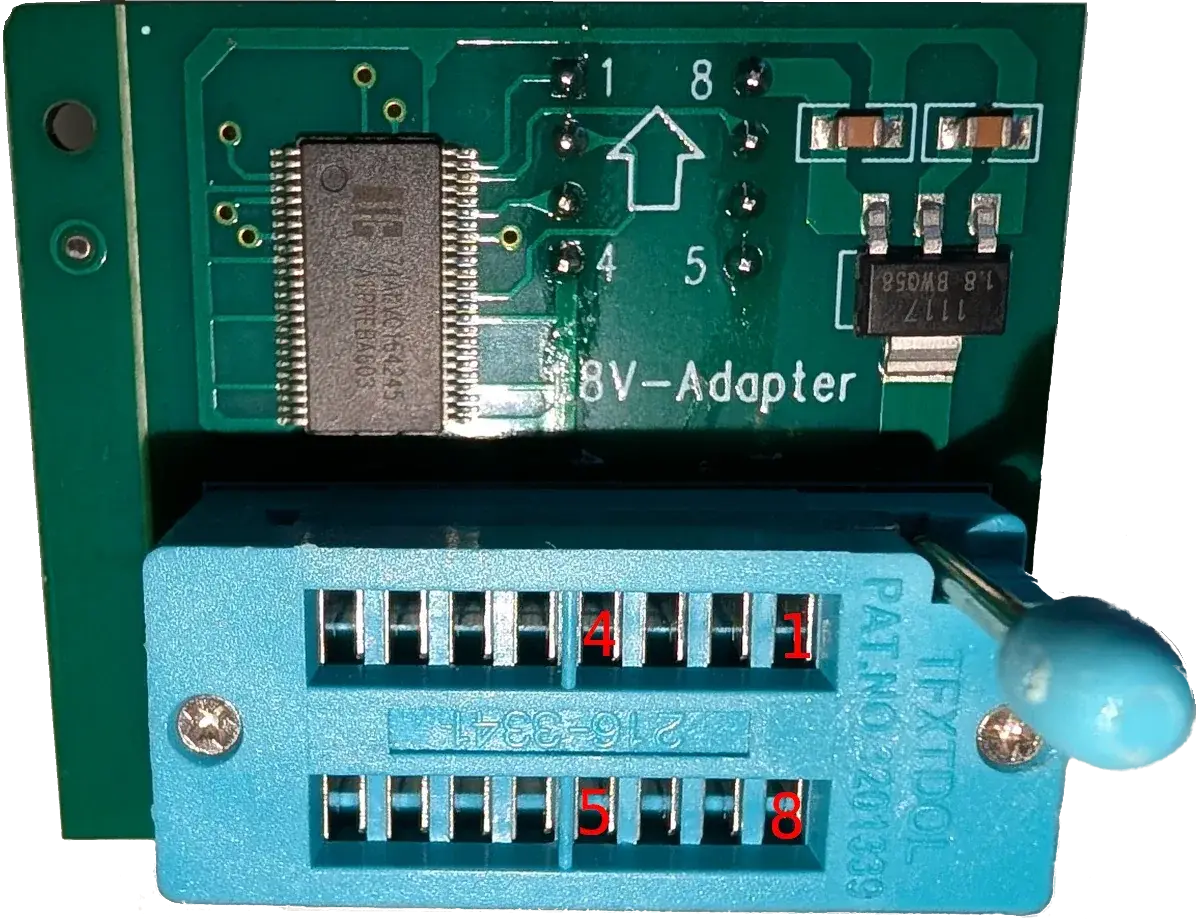
Cheap CH341A programmers are everywhere because they turn USB into a useful little SPI tool. But Chen measures the output of one unit he considered and finds a level that is unsafe for the 1.8-volt device without appropriate conversion. He ultimately uses a CH347-based programmer with a separate 1.8-volt level shifter and a WSON8 pogo-pin probe.1
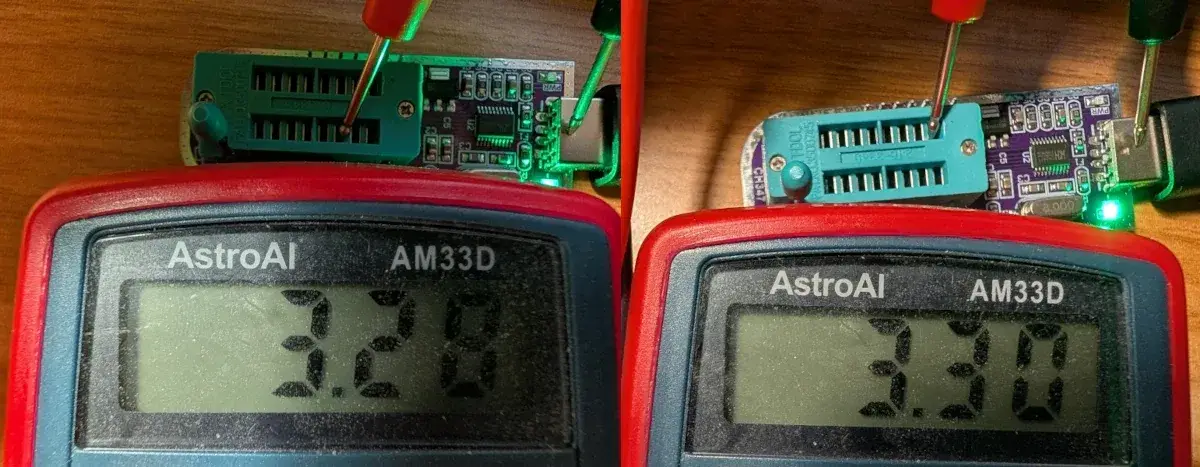
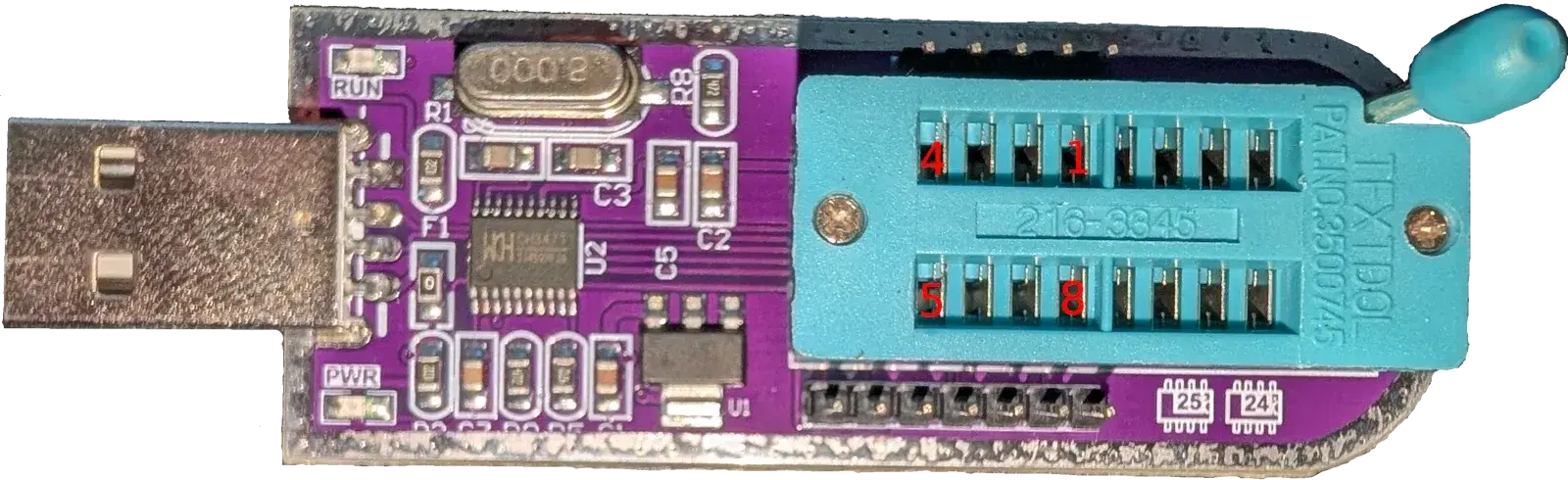
Here a US$5 adapter matters more than the US$500 board it touches.
It is also why "fixed with $20 of tools" should not be translated into "easy $20 repair."
The tools were cheap. The knowledge was not.
Contact without simplicity
The March 2025 Framework recovery involved soldering wires to the flash pins.3 Chen wanted a path that did not require that level of board modification.
His key purchase is a pogo-pin probe shaped to contact the WSON package from above.1
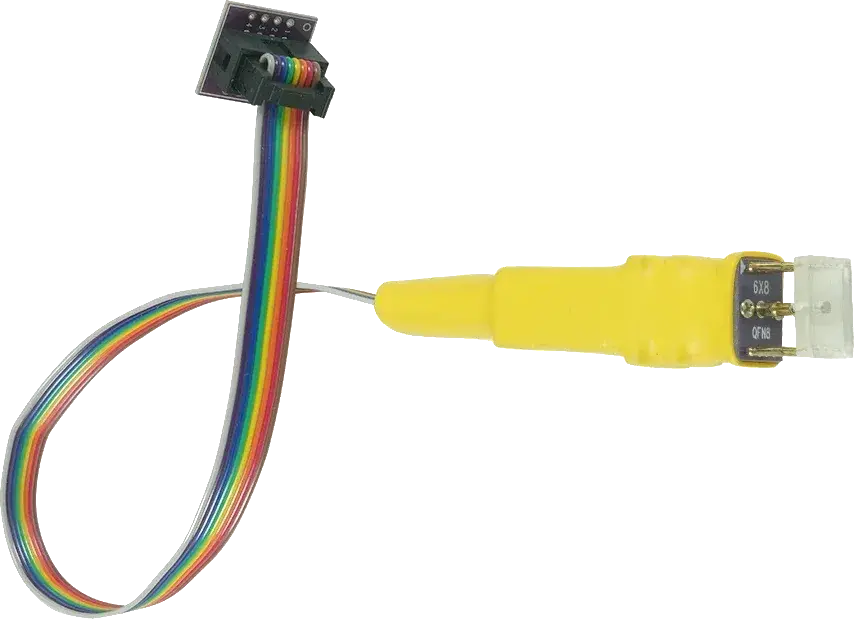
That removes one difficult operation: desoldering the package or attaching tiny wires.
The probe removes soldering from the job, but the procedure is still nowhere near plugging in a USB cable.
With the battery disconnected, the probe still has to land on the correct pads and the voltage translation has to be right; depending on the surrounding circuit, an external programmer may energize more of the board than the flash chip itself. Before trusting a write, the operator needs repeatable reads and a firmware image that matches the required format and region.13
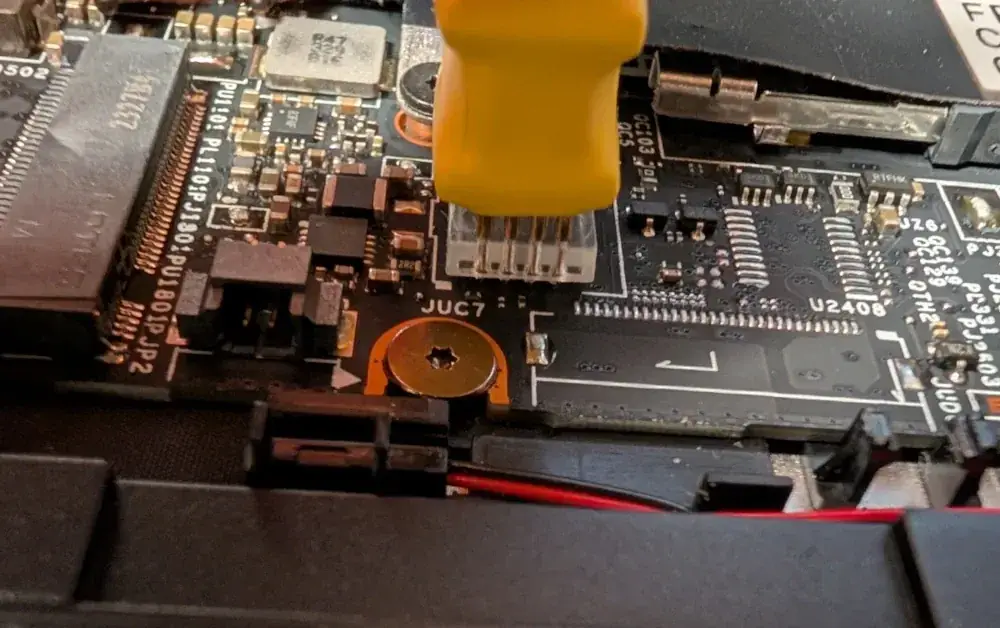
The Framework's physical accessibility matters here because Chen can expose the mainboard and reach the chip without destroying an enclosure; that advantage is real, even though the recovery procedure itself remains a separate problem.
But access to a component and access to a recovery procedure are different things.
One is mechanical. The other is informational and electrical.
A useful repair design has to care about both.
The wrong bytes
Even after reaching the flash device, Chen still does not have a ready-made raw image to write.
Vendor firmware packages are designed for update mechanisms, not necessarily for external programmers. They may contain capsules, metadata, signatures, several regions or payloads arranged differently from the physical flash layout.
Chen uses an InsydeH2O extraction tool, then modifies/forks it to obtain the image he needs from Framework's BIOS package.1
This small extraction step matters more than it first appears.
When people say that firmware is "available," they may mean several different things:
- an updater exists;
- a signed capsule exists;
- source code exists;
- a raw binary suitable for a programmer exists;
- an old version remains downloadable;
- documentation explains which bytes belong where.
Those are not equivalent.
A manufacturer can provide excellent automatic updates while leaving board-level recovery dependent on reverse engineering the update package. Conversely, publishing a raw image without a safe update mechanism leaves the owner with a poor recovery experience.
Repairability needs both directions: a convenient path when the machine is healthy and a documented escape path when it is not.
That escape path does not necessarily need to invite every owner to clip a programmer onto a chip. Possible designs include a protected recovery partition, a second firmware bank and USB recovery; another option is a service connector with a documented procedure.
The important property is that the path exists below the failure it is supposed to repair.
The boring second copy
Firmware recovery often looks wasteful from the perspective of a successful boot.
A second firmware copy consumes flash, a recovery controller adds complexity, and a service port occupies board area; button combinations need testing, documentation has to survive product revisions, and recovery files must keep being generated and signed correctly.
All of that is overhead for a situation most owners will never see.
Repairability is full of this kind of overhead.
Screws are heavier than glue and sockets cost more than soldering memory directly; labelled connectors occupy space, replaceable batteries need mechanical interfaces, and a recovery image consumes storage that sits idle during almost every normal boot.
The benefit appears only when something fails.
That is why measuring repairability only from teardown time can be misleading. A machine can score well while everything is mechanically intact and still have catastrophic single points in firmware, authentication, calibration or cloud services.
The best repair features are often latent interfaces: mostly invisible until the exact day they become the difference between a procedure and a replacement.
Firmware is material durability
A BIOS update is usually discussed as security maintenance. Framework's 3.20 release exists because firmware evolves, and Chen says the company recommended staying current for security, stability and performance.14
That creates a tension.
A durable machine needs updates because vulnerabilities and hardware bugs do not stop existing when the warranty ends. But each update is also a write to one of the layers required for the machine to start.
If an owner learns that updating an out-of-warranty machine can turn a functional board into a several-hundred-dollar replacement, the rational response may be to stop updating.
That is bad for security and bad for longevity.
A robust recovery mechanism changes the economics of trust. It makes "install the update" less like a one-way wager. The owner knows there is a lower-level route back if power, firmware or the updater fails.
This is where firmware recovery becomes part of physical sustainability rather than a niche concern for BIOS enthusiasts.
If a laptop remains mechanically useful for eight years, its firmware process also has to remain trustworthy in year six, when the warranty may be long gone but security fixes still matter.
Otherwise the very act intended to extend secure support can shorten the useful life of the hardware.
Beyond the programmer
Chen's shopping list is delightful because it punctures the price of a mainboard. A programmer, level shifter and probe can be astonishingly cheap compared with a replacement computer part.1
But using the sticker price as the repair cost would tell the wrong story.
Chen spent time reading forum reports, identifying the flash chip, researching programmers, measuring voltages, extracting firmware, waiting for parts, testing contact and verifying reads before committing to a write.1
The March 2025 owner needed soldering, an external supply, a level shifter, a Raspberry Pi and enough confidence to notice that powering the flash rail was drawing far more current than the chip alone should consume.3
That is labor. More importantly, it is diagnostic labor under uncertainty.
The repair was cheap because the owners already possessed or were willing to acquire skills that a normal service process would have to provide professionally.
This is why documentation is a repair tool.
If a manufacturer publishes the chip identity, voltage, recovery image format, programmer pinout and verification procedure, the same physical repair becomes dramatically cheaper even if not a single screw changes.
Knowledge reduces the expensive part: uncertainty.
Documentation made repair possible
There is another piece of repair infrastructure here, and it is not mounted on the mainboard. Chen published a detailed post with photos of the chip, programmer, level shifter and pogo setup, while the earlier Framework Community user left a separate account of the Raspberry Pi recovery, including the electrical problems encountered on the way.13
Put those two online records beside the flashrom documentation and the result starts to look like an unofficial service manual assembled in public.5 A person arriving with the same dead laptop no longer begins with a blank search box: there are component markings to compare, photos showing where the flash sits, descriptions of the voltage problem, commands that were actually tried, and warnings about what went wrong.
This does not absolve the manufacturer. Forum posts are fragile, personal websites vanish, and one owner’s successful repair never becomes an official procedure merely because it worked once. But public notes change the cost of the next repair because they remove some of the uncertainty that made the first one difficult.
The difference is easy to underestimate. The programmer itself costs very little; the expensive part is discovering which programmer is safe, which image is usable and whether the strange behaviour on the bench means a dead chip, a bad contact or the rest of the board being powered through the flash rail. Photos, measurements and a written sequence turn private debugging into something another person can inspect.
Repair knowledge works a little like a spare part: it has to remain available when the machine is old enough to need it. If the only useful instructions survive in one support ticket, they are effectively unavailable to everyone else. When owners publish what they found, the machine acquires a second, unofficial maintenance layer online.
The failure ladder
There is a useful way to think about the two Framework recoveries: as a ladder.
At the top are ordinary actions available to any owner: wait, reboot, reset, retry.
Below that are vendor-supported recovery modes: alternate firmware copy, recovery partition, USB image, special boot path.
Below that are service procedures: diagnostic connector, external programmer, documented test pads.
At the bottom are invasive techniques: soldering wires, removing chips, tracing buses, reconstructing firmware layouts.
A good repairable product does not need to make the bottom rung disappear. Strange failures will always exist. It should try to keep common failures as high on the ladder as possible.
In Chen's case, the successful path ended near the bottom even though the physical machine was designed to be opened.1
That mismatch is the interesting design failure.
Framework's modular architecture says: "you may enter this machine."
The firmware recovery path, in these cases, effectively said: "not here."
The visible gap
It would be easy to use this incident as evidence that Framework's repairability promise is fake. That conclusion would be as shallow as ignoring the failure.
The reason Chen could attempt this repair cleanly is partly that the board is physically accessible. The reason the incident matters is precisely because Framework has raised expectations about what owning and maintaining a laptop can look like.
A sealed machine whose official repair is always "replace the motherboard" is merely behaving as designed.
A modular machine invites a better question: why is the firmware recovery interface not designed with the same philosophy as the hardware interface?
The useful design question is therefore practical rather than rhetorical: why should the firmware recovery interface follow a different philosophy from the hardware interface? Nobody needs a CH347 in every Framework owner's drawer. A better machine would simply leave fewer owners needing to know what one is.
Maybe that means a robust dual-bank update strategy. Maybe it means a protected recovery environment. Maybe it means a documented external recovery connector and raw images for service. The exact architecture is an engineering decision with security, cost and board-space consequences.
But the product goal is clear: a failed maintenance operation should not make a healthy mainboard economically indistinguishable from a dead one.
Code wakes matter
Modern objects are full of boundaries we pretend are separate.
Hardware is physical. Software is editable. Repair is mechanical. Updates are maintenance.
A bricked BIOS collapses all four categories at once.
The board is physically intact, but software prevents it from becoming usable hardware. The repair is an electrical operation performed to change code. A routine maintenance update ends with the laptop on a bench.
That is why this Framework story belongs beside battery tabs, screws and spare-part catalogs when we talk about repairability.
The question is no longer only whether an owner can replace a component.
It is whether the object provides a recoverable route through the layers that make those components function together.
Chen eventually got his laptop back by touching spring-loaded pins to a tiny flash package and rewriting it from outside.1 The feat is impressive. It should also feel slightly absurd.
A repairable computer should be proud that such a rescue is possible.
It should be even prouder when nobody has to do it.